What is search autocomplete?
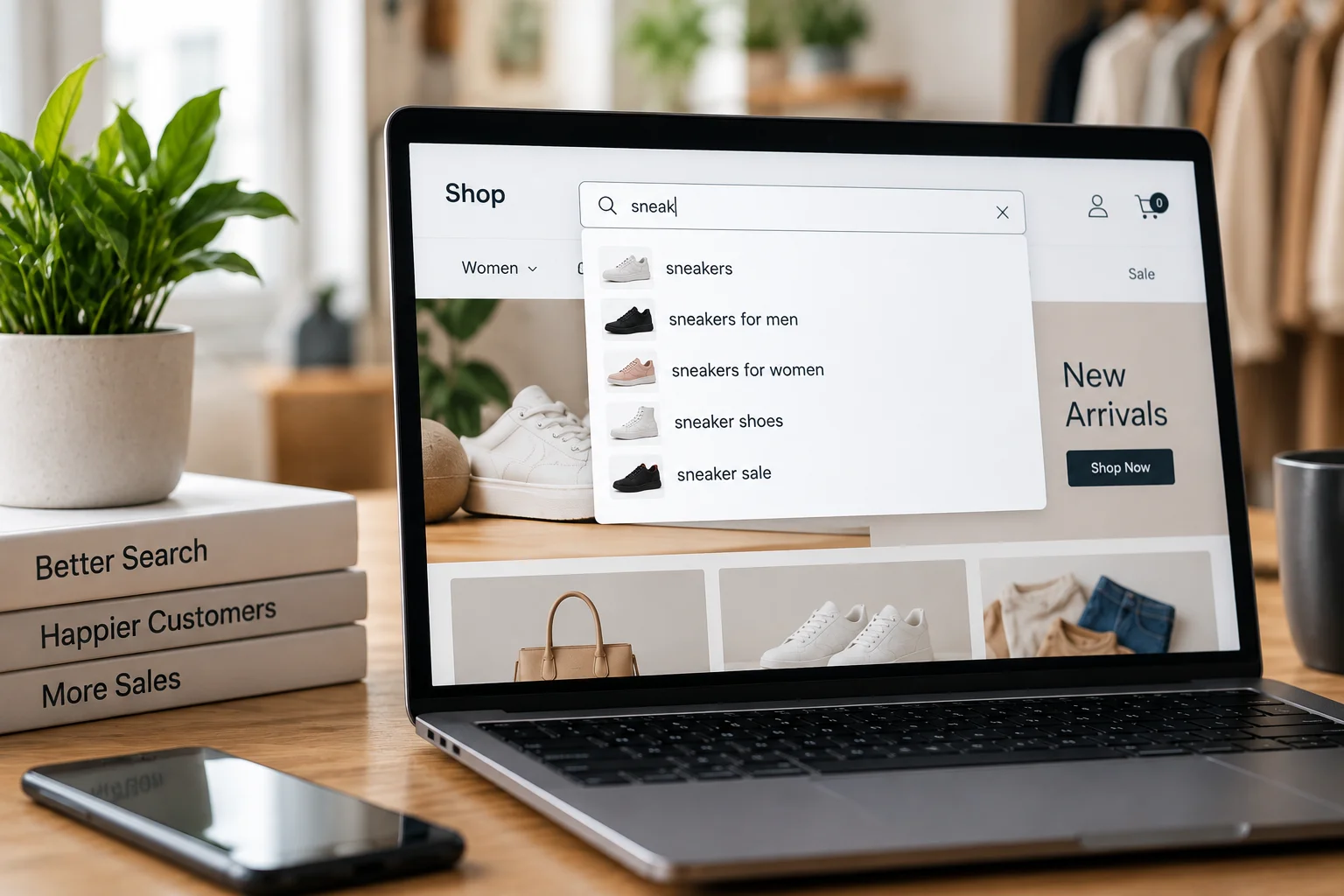
In ecommerce, however, it does more than finish words. Modern search autocomplete can suggest queries, categories, brands, and specific products at once.
Why search autocomplete matters so much
Three reasons make autocomplete unusually important.
First, it intercepts intent early.
A shopper who types three letters has already told you something. Good suggestions turn that fragment into a clear destination.
Second, it prevents dead ends.
Suggestions only point to queries and products that exist. Consequently, shoppers who follow them rarely hit a zero-result page.
Third, it corrects mistakes silently.
A shopper typing “addidas” can see Adidas suggestions without ever knowing they misspelled it.
Research from the Baymard Institute consistently finds autocomplete implementation varies enormously in quality across major retailers. In practice, many sites offer suggestions that confuse more than they help.
Where search autocomplete usually fails
Most weak autocomplete shares a handful of problems.
Suggestions that lead nowhere.
The dropdown suggests a query that returns zero results. This is surprisingly common and deeply frustrating.
Too many suggestions.
A dropdown with fifteen items overwhelms rather than helps.
Query-only suggestions.
Text completions with no products, images, or prices.
Slow response.
Suggestions that lag behind typing get ignored entirely.
No typo tolerance.
A single wrong letter kills all suggestions.
Mobile afterthought.
A dropdown designed for desktop that obscures the keyboard on mobile.
Each has a clear fix.
AI Search Grader by bCloud AI
Grade your ecommerce search in 10 quick questions
31% of ecommerce searches return zero results — and most shoppers who hit a dead end leave for a competitor. How does your store's search stack up?
Answer 10 short questions and get your AI search score, plus a personalized report to fix the gaps. Free, takes about 2 minutes.
No signup needed to take the quiz.
Understanding intent…
Scoring your answers across relevance, AI, experience, and insights.
Your AI search score is ready
Tell us where to send your personalized report. You'll see your score and recommendations right away.
Your score by pillar
Personalized recommendations
Fix the gaps in weeks, not quarters
bCloud AI replaces keyword-only search with hybrid AI retrieval — sub-200ms responses, 99.99% uptime, and conversion lifts of up to 40% across 50+ implementations.
8 proven ways to improve search autocomplete
1. Only suggest queries that return results
This is the most important rule. Every suggestion should lead somewhere useful.
Therefore, validate suggestions against your catalog. If a suggestion would return zero results, drop it. Our no-results guide explains why dead ends cost so much.
2. Show products, not just text
Query completions help. Product suggestions help more.
Show a small set of actual products with an image, name, and price. As a result, shoppers who know what they want can click straight through.
For repeat purchases especially, this is often the fastest path to a cart. Our high-intent shoppers guide covers why this segment converts from autocomplete so often.
3. Keep it fast
Suggestions should appear as fast as a shopper types. Anything noticeably slower gets ignored.
In practice, aim for well under 100 milliseconds per keystroke. That usually means dedicated indexing for suggestions, separate from full search.
4. Tolerate typos
Shoppers misspell constantly, especially on mobile. Search autocomplete should match “comptuer,” “addidas,” and “wireles” without complaint.
In addition, tolerate partial words. A shopper typing “runn” should already see running shoes.
5. Keep the list short and structured
Fewer, better suggestions beat long lists. Five to eight items is usually plenty.
Group them clearly. For example: two or three query suggestions, a couple of categories, and three or four products. Structure helps shoppers scan quickly.
6. Rank suggestions by what converts
Alphabetical suggestions help nobody. Instead, rank by popularity, conversion, and availability.
Moreover, never suggest out-of-stock products in autocomplete. A shopper clicking a suggestion expects to buy it. Our real-time indexing guide covers keeping availability current.
7. Understand meaning, not just letters
Traditional search autocomplete only matches characters. AI-powered autocomplete understands meaning too.
So a shopper typing “warm jacket for” can see rain shells and insulated coats, even if no title contains those words. Our what is semantic search guide explains how.
That said, keep exact matching for SKUs and model numbers. A shopper typing a part number wants that part, not something similar. This is why hybrid retrieval matters, as covered in our hybrid search guide.
8. Design for mobile first
Most ecommerce traffic is mobile. Therefore, autocomplete has to work on small screens.
Keep suggestions above the keyboard. Make tap targets large. And show fewer items than on desktop, since screen space is scarce.
Search autocomplete and faceted search together
Autocomplete and faceted search work best as a pair. Autocomplete helps shoppers start well. Filters help them finish well.
The best implementations connect them. For example, a suggestion like “running shoes in women’s” can open results with the gender filter already applied. Our faceted search guide covers the filtering side.
Personalizing autocomplete
Personalized suggestions can lift conversion noticeably. However, they need care.
For returning shoppers, surface their usual products first. A shopper who buys the same coffee weekly should see it after typing two letters.
At the same time, don’t let personalization override intent. If a shopper types something new, show them what matches, not their history. Our vector search personalization guide covers striking that balance.
Search autocomplete by platform
Your platform shapes what’s possible natively.
Shopify
includes predictive search in most themes. It’s reasonable for small catalogs but limited in ranking control. See our AI search for Shopify guide.
WooCommerce
has no live autocomplete by default. Results only appear after the full query is submitted. Our WooCommerce search guide covers the fix.
Magento and Adobe Commerce
support autocomplete through OpenSearch, and Adobe’s Live Search adds AI-driven suggestions for Commerce edition stores. See our Magento search guide.
BigCommerce
offers quick search in its themes, with apps extending it further. Our BigCommerce search guide covers the options.
Measuring search autocomplete
Five metrics show whether autocomplete is earning its place.
Suggestion click rate.
What share of searches involve clicking a suggestion? Low rates mean suggestions aren’t useful.
Conversion from autocomplete.
What share of sessions convert after an autocomplete click? This is the headline number.
Suggestion-to-zero-result rate.
How often a clicked suggestion leads nowhere. This should be zero.
Keystrokes before click.
Fewer keystrokes means suggestions are predicting well.
Abandonment after typing.
Shoppers who type, see suggestions, and leave. Rising numbers signal a problem.
Validate every change with a controlled test. Our A/B testing guide and search relevance metrics cover the methodology.
A two-week search autocomplete plan
Days 1 to 3: audit.
Type your top fifty queries and note what autocomplete suggests. Flag any suggestion that leads to zero results.
Days 4 to 7: fix the basics.
Remove dead-end suggestions, add product previews, and enable typo tolerance.
Week 2: refine.
Rank by conversion, hide out-of-stock items, and test on mobile. Then set up the five metrics above.
After that, review suggestion performance monthly. New products and seasonal vocabulary change what shoppers type.
Common search autocomplete mistakes to avoid
Even solid search autocomplete drifts over time. These six mistakes appear constantly.
Suggesting trending terms blindly.
Popular queries aren’t always useful ones. So filter suggestions by whether they convert, not just by volume.
Showing internal jargon.
Suggestions pulled from product codes or category names can confuse shoppers. Instead, prefer the language shoppers actually type.
Forgetting seasonality.
Search autocomplete tuned in summer serves winter shoppers badly. Therefore, review suggestions ahead of each season.
Ignoring zero-click patterns.
When shoppers see suggestions and click none, the suggestions missed. Track this closely.
Treating desktop and mobile the same.
Mobile screens fit fewer suggestions. Consequently, mobile search autocomplete should show a shorter, tighter list.
Never testing.
Search autocomplete changes feel obvious, yet results often surprise. So test changes against a control before rolling them out.
Search autocomplete for different store types
Search autocomplete should adapt to how your shoppers buy.
Fashion and home stores
benefit most from product previews with images, since shoppers judge visually.
B2B and parts stores
need exact code matching first. Search autocomplete should resolve a partial SKU before suggesting anything else. Our B2B SKU search guide covers why.
Grocery and replenishment stores
should surface repeat purchases first, because most baskets repeat week to week.
Large marketplaces
should group suggestions by product rather than showing duplicate listings from different sellers.
In short, the best search autocomplete reflects your customers, not a generic template.
A quick search autocomplete checklist
Before launching or reviewing search autocomplete, confirm each point below.
✓ Every suggestion returns at least one result.
✓ Product previews show an image, name, price, and availability.
✓ Suggestions appear in well under 100 milliseconds.
✓ Typos and partial words still produce suggestions.
✓ The list shows roughly five to eight grouped items.
✓ Out-of-stock products never appear.
✓ SKUs and model numbers resolve exactly.
✓ Mobile suggestions sit above the keyboard with large tap targets.
In addition, write down your current suggestion click rate before changing anything. That baseline is what proves your work paid off.
Where search autocomplete is heading
Two developments are worth watching.
First, suggestions are becoming conversational.
Instead of finishing words, search autocomplete increasingly suggests complete questions and refinements.
Second, suggestions are becoming more personal.
Returning shoppers will see their own patterns reflected earlier in the list.
Both depend on the same foundation: clean product data and fast, accurate indexing. So investing in those now pays off whichever direction search autocomplete takes. Our conversational search engine guide covers the multi-turn side.
Key takeaways
Search autocomplete intercepts intent before shoppers finish typing. Therefore, it deserves the same attention as full search. Only suggest queries that return results, show real products with prices, and keep suggestions fast. In addition, tolerate typos, rank by what converts, and hide out-of-stock items. Keep exact matching for SKUs alongside semantic understanding. Most importantly, measure suggestion click rate and conversion so every change is proven, not assumed.
Who owns search autocomplete?
Search autocomplete often falls between teams. Engineering owns the technology, merchandising owns the catalog, and marketing owns the brand language. As a result, nobody reviews what shoppers actually see in the dropdown.
The fix is simple. Give one person the suggestion click rate and autocomplete conversion as part of their goals. Then schedule a short monthly review of the top fifty queries and what they suggest. That small habit catches dead-end suggestions, stale seasonal terms, and missing products long before they cost real sales. In addition, it builds a record of what worked, which makes the next round of improvements faster.
Frequently asked questions
What is search autocomplete?
Search autocomplete predicts what a shopper wants as they type and shows suggestions in a dropdown. In ecommerce it can suggest queries, categories, brands, and specific products at once. It’s also called predictive search, autosuggest, or type-ahead search.
Why is search autocomplete important for ecommerce?
It intercepts intent early, prevents dead ends by only suggesting things that exist, and corrects typos silently. Many shoppers click a suggestion and go straight to a product without ever seeing a results page.
How many autocomplete suggestions should I show?
Five to eight is usually enough, grouped clearly into query suggestions, categories, and products. Long lists overwhelm shoppers, and on mobile you should show fewer than on desktop.
How fast should search autocomplete be?
Suggestions should keep pace with typing, which in practice means well under 100 milliseconds per keystroke. Slow suggestions get ignored, so autocomplete usually needs dedicated indexing separate from full search.
Should autocomplete show products or just text?
Both, ideally. Query completions help shoppers phrase their search, but product previews with an image, name, and price let shoppers who know what they want click straight through, which is often the fastest path to a sale.
What is AI-powered search autocomplete?
It understands meaning as well as characters, so a partial phrase like “warm jacket for” can surface relevant products even when no title contains those words. Good implementations keep exact matching for SKUs and model numbers alongside semantic understanding.
Does WooCommerce have search autocomplete?
Not by default. WooCommerce’s native search shows results only after the full query is submitted, with no live suggestions. Stores add autocomplete through a search plugin or a dedicated search platform.
How do I measure search autocomplete performance?
Track suggestion click rate, conversion from autocomplete, the rate at which clicked suggestions lead to zero results, keystrokes before click, and abandonment after typing. Validate changes against a control group.
Suggestions that sell before shoppers finish typing.
bCloud AI delivers product-level autocomplete with typo tolerance and semantic understanding — fast enough to keep up with every keystroke.
bcloud.ai