


What is a website product configurator?
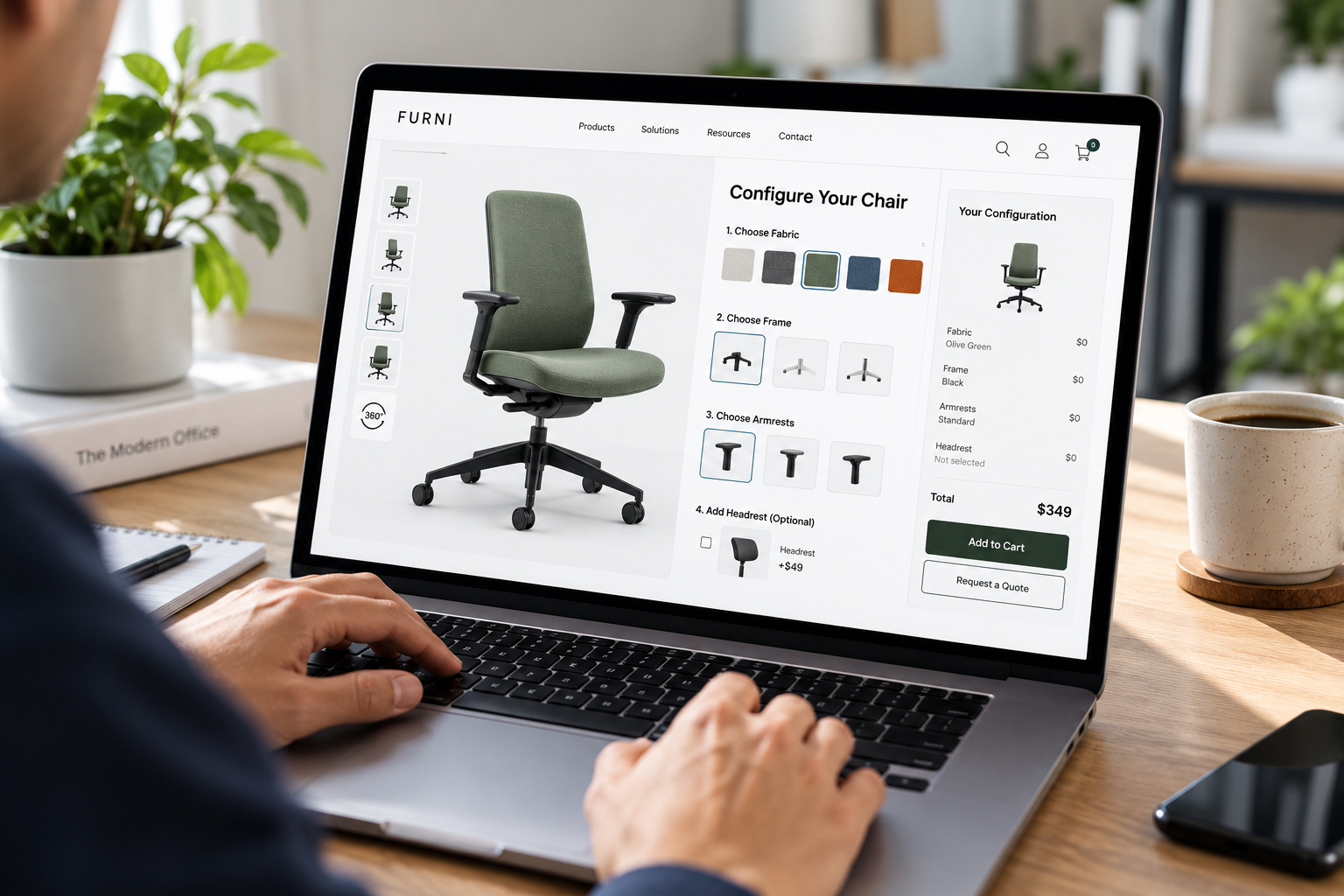
Configurators appear in many categories:
Furniture and home.
Fabric, finish, size and modules.
Bikes and sporting goods.
Frame, components and accessories.
Apparel and accessories.
Monograms, colors and fit.
Signage and print.
Dimensions, materials and mounting.
Industrial and B2B products.
Assemblies, specifications and accessories.
AI Search Grader by bCloud AI
Grade your ecommerce search in 10 quick questions
31% of ecommerce searches return zero results — and most shoppers who hit a dead end leave for a competitor. How does your store's search stack up?
Answer 10 short questions and get your AI search score, plus a personalized report to fix the gaps. Free, takes about 2 minutes.
No signup needed to take the quiz.
Understanding intent…
Scoring your answers across relevance, AI, experience, and insights.
Your AI search score is ready
Tell us where to send your personalized report. You'll see your score and recommendations right away.
Your score by pillar
Personalized recommendations
Fix the gaps in weeks, not quarters
bCloud AI replaces keyword-only search with hybrid AI retrieval — sub-200ms responses, 99.99% uptime, and conversion lifts of up to 40% across 50+ implementations.
Product configurator vs. guided selling vs. CPQ
These three tools are often confused. They solve different problems, and many stores use more than one.
In practice, they often run in sequence. A guide helps the shopper choose a product family, a configurator customizes it, and in B2B a quoting step prices it. See guided selling tools and CPQ for B2B ecommerce.
Do you need a product configurator?
A configurator earns its place when customization is part of what customers are buying. It is usually worth it if:
Products have several options that combine in many ways
Some combinations are invalid and need to be blocked
Price changes with the options chosen
Shoppers want to see the result before they buy
Your team currently handles customization by email or phone
On the other hand, if you sell a few fixed variants, standard variant selectors on the product page are usually enough. A full product configurator adds cost and complexity that simple catalogs do not need.
8 rules for a product configurator that converts
1. Start with a sensible default, not a blank slate
Open with a popular, complete configuration. Shoppers can then change what they care about instead of building from nothing. A finished starting point also shows a realistic price straight away.
2. Keep steps short and show progress
Nielsen Norman Group describes a wizard as a step-by-step process where later steps depend on earlier ones, and recommends it for novice users and infrequent tasks (NN/g). Most configurator users fit that description. So group options into a few clear steps, label them in plain language and show how far along the shopper is.
3. Update the price live
Every option that changes the price should change it on screen immediately. Surprises at checkout cause abandonment. See cart abandonment.
4. Block invalid combinations, and explain why
If an option is unavailable with the current choices, grey it out with a short reason. “Not available in the 60-inch size” is far better than a silent error.
5. Show the result
Shoppers want to see what they built. A preview that updates with each choice builds confidence. Even simple swatches and images help; full 3D is a bonus, not a requirement.
6. Let shoppers save and share
Many configured purchases involve someone else’s approval: a partner, a manager, a client. A shareable link or saved configuration keeps the sale alive between sessions.
7. Design for the phone first
Most shoppers will open your product configurator on a phone. One step per screen, large tap targets and a sticky price summary make the difference. See mobile commerce search.
8. Connect it to real inventory and lead times
A configuration that cannot be built, or will take twelve weeks, should say so before checkout. Connect options to stock and lead-time data so promises stay accurate. See real-time indexing.
Build or buy a product configurator?
Teams usually face this choice early. Each path has trade-offs.
Platform apps and plugins.
Quickest to launch and affordable. They suit simple option sets, but complex rules and B2B pricing can outgrow them.
Dedicated configurator software.
Stronger rules engines, visual previews and integrations. Better for high-option or high-ticket products, with higher cost and setup time.
Custom builds.
Full control over the experience. However, you also own every rule change, bug and performance issue for as long as the tool lives.
Whichever path you pick, budget for the same two things: clean option data and ongoing ownership. A product configurator built on messy data, with nobody maintaining it, decays quickly as products change.
The search problem most configurator projects miss
Here is a gap that costs configurable stores real revenue. Shoppers search for the configured product, not the base product.
Someone types “walnut dining table that seats eight.” Your catalog has one configurable “Harlow Dining Table,” where walnut is a finish option and the eight-seat size is a dimension option. A basic search engine looks at the product title, finds no match for “walnut” or “eight” and returns nothing useful.
The fix is to make option data searchable. Finishes, sizes, materials and other options should be indexed as attributes of the configurable product, so search can match the shopper’s words to the right base product, then open the configurator with those options pre-selected. That is a job for an ecommerce product search engine, and it depends on clean option data. See product data enrichment.
bCloud AI is not a product configurator. We provide the search and discovery layer that gets shoppers to the right configurable product. Our hybrid search understands descriptive queries like this one, and AI Browse supports visual, image-driven discovery on category pages. Both connect to your stack through integrations.
Product configurators for B2B
B2B configurators work differently from consumer ones. The buyer is usually choosing specifications, not styles, and the result often needs a formal quote.
So a B2B product configurator should accept technical inputs such as dimensions, ratings and standards, check compatibility rigorously and hand off cleanly to quoting. It should also let buyers start from a part number they already know. See manufacturer search.
SEO for configurable products
Configurators can quietly hurt organic visibility if every option creates a new, thin URL. A few principles keep things clean.
Decide which variants deserve their own page.
Popular, distinct variants may merit indexable URLs. Minor option combinations usually do not.
Use variant structured data.
Google’s documentation on product variants explains how to group variants with ProductGroup, declare the attributes they vary by with variesBy, and give each variant its own Product entry with a unique identifier such as a SKU or GTIN (Google Search Central). See also our product schema markup guide.
Keep the base product page strong.
It should rank for the product type, describe the main options in text and link clearly into the configurator.
Avoid infinite parameter URLs.
Option selections should not generate endless crawlable URLs. Use canonical tags and sensible URL rules.
A simple example
Picture a store selling custom office chairs. The base model has four choices: fabric, armrests, lumbar support and base finish.
The shopper arrives from a search for “ergonomic chair with adjustable lumbar, black mesh.” Search recognizes “mesh,” “black” and “adjustable lumbar” as option values and returns the right chair, opening the configurator with those options pre-selected.
The shopper changes only the armrests, sees the price update, saves the configuration and shares it with their office manager. The manager opens the link, approves and checks out. The configurator did the customizing, but search made the sale possible.
How to measure a product configurator
That last metric matters more than it looks. Custom products are often hard to resell, so returns are expensive. A clear preview and accurate option descriptions prevent many of them. See ecommerce returns.
Common product configurator mistakes
Too many options at once.
Group them into steps, and hide advanced options until needed.
Prices that appear only at the end.
Show the price from the first screen.
Silent errors.
Explain why an option is unavailable.
Desktop-only design.
Test the full flow on a real phone.
Unsearchable options.
If finishes and sizes are not indexed, shoppers searching for them will never find the product.
Where configurators are heading
Looking ahead, three shifts will shape the next generation of configurators.
Conversational configuration.
Shoppers will describe what they want, such as “an eight-seat walnut table with tapered legs,” and get a proposed configuration to adjust. See conversational search engine.
Richer previews.
Realistic renders and in-room views will become more common as they get cheaper to produce.
Agents that configure on a shopper’s behalf.
As AI assistants shortlist products, they will rely on structured option data to propose valid configurations. Stores with clean variant data will be easier to recommend. See AI shopping decisions.
For the broader context, see our future of ecommerce forecast. And if you are comparing platforms to power discovery around your configurator, our guide to the best search engine for ecommerce and our guide to choosing a search engine for your ecommerce website are useful starting points.
The bottom line on product configurators
A good website product configurator makes customization feel easy: sensible defaults, short steps, live pricing, clear rules and a preview that matches what arrives.
However, the configurator is only half the journey. Shoppers still need to find the right configurable product, and that depends on searchable option data, strong product pages and clean variant markup. Get both halves right, and customization becomes one of your strongest sources of revenue and loyalty.
Frequently asked questions
What is a website product configurator?
It is an interactive tool that lets shoppers customize a product by choosing options such as size, material, color or components, while enforcing valid combinations, updating the price and often showing a preview.
What is the difference between a product configurator and guided selling?
Guided selling helps shoppers choose which product to buy based on their needs. A product configurator helps them customize a product they have already chosen.
What is the difference between a product configurator and CPQ?
A configurator handles option selection and preview. CPQ adds pricing rules, discounts, quoting and approval, and is mainly used for complex B2B sales.
Do I need a 3D product configurator?
Not necessarily. Clear steps, live pricing, valid-combination rules and simple visual previews deliver most of the value. 3D helps for high-ticket, highly visual products.
How do configurable products affect SEO?
Every option combination can create thin, duplicate URLs if unmanaged. Use canonical tags, decide which variants deserve pages, and add variant structured data using ProductGroup and Product markup.
Why can’t shoppers find my configurable products in search?
Usually because option values such as finishes, sizes and materials are not indexed as searchable attributes. Indexing them lets search match descriptive queries to the right configurable product.
How do I measure configurator performance?
Track start rate, completion rate, step-level drop-off, configured-product conversion, saves and shares, and the return rate on configured items.
Should a product configurator work on mobile?
Yes. Many shoppers will use it on a phone, so one step per screen, large tap targets and a visible price summary are essential.
Is bCloud AI a product configurator?
No. bCloud AI provides search and discovery that helps shoppers find the right configurable products by understanding descriptive queries and indexing option data, and it works alongside your configurator.
Make every option searchable.
bCloud AI indexes your finishes, sizes and materials so shoppers searching for the configured product land on the right base product. See it on your catalog.
bcloud.ai