Ecommerce Search UX: Design the Experience That Turns Queries Into Purchases
What Is Ecommerce Search UX?
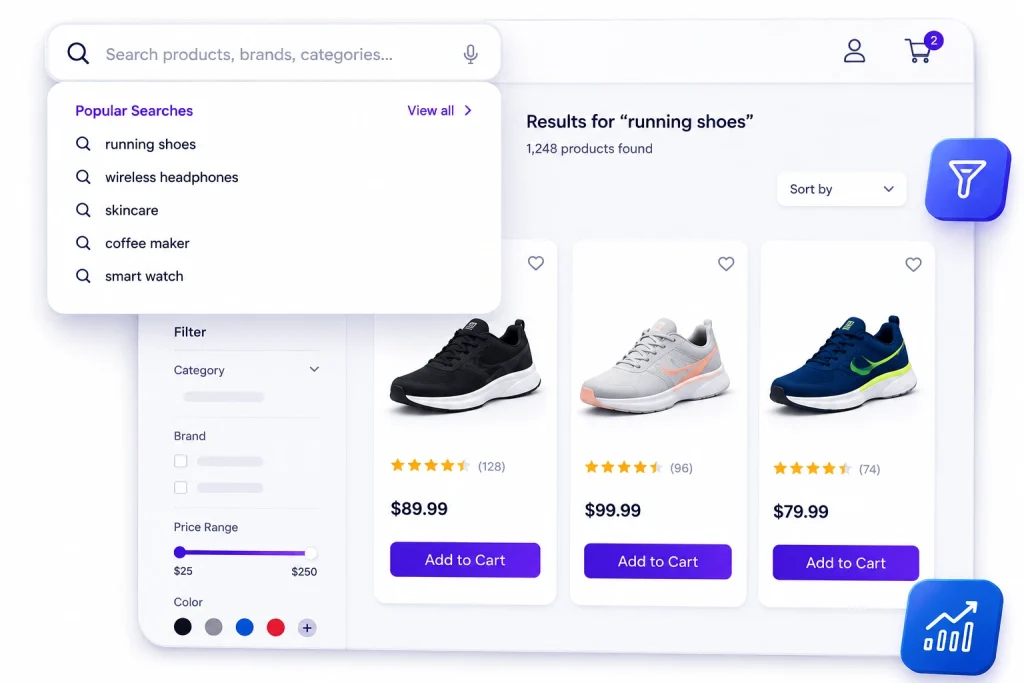
It's where search technology meets human behavior — the engine determines what could be found, and the UX determines whether shoppers actually find it.
Search Journey
🔍
Search Bar
Easy to find & accessible
⚡
Autocomplete
Helpful suggestions
📦
Results
Clear product discovery
🎯
Purchase
Fast path to conversion
Why Search UX Matters
Hidden Search Bar
A hidden search bar suppresses usage of your highest-converting feature.
Weak Autocomplete
Weak autocomplete forces full typing and typos.
Cluttered Results
A cluttered results page hides the right product below the fold.
Confusing Filters
Confusing filters cause abandonment right at the refinement moment.
The Search Journey, Stage by Stage

Search UX Principles That Hold Everywhere
Design for the Worst Case
The shopper on a slow connection, with a misspelled query, on a small screen, is the one your UX either saves or loses.
01
02
Stay Predictable
Search should behave the way shoppers expect from the web's best experiences.
Reduce Effort
Every keystroke saved, tap removed, and decision simplified lifts completion.
03
04
Show, Don't Describe
Thumbnails in autocomplete, images in results, visual filter states.
Maintain Momentum
Speed and responsiveness at each step keep shoppers moving toward purchase.
03
04
Never Dead-End
Every state — typo, zero results, ambiguous query — should offer a next step.
9 Proven Ecommerce Search UX Wins
Win
Why it works
Search UX and AI: Where the Engine Meets the Experience
01
Invite Natural Language
Semantic understanding means the UX can invite natural language instead of training shoppers to keyword-speak.
02
Deliver Personalized Results
Personalization makes the first screenful the right screenful for every shopper.
03
Create Conversation
Conversational interfaces turn search into dialogue for shoppers who want guidance.
04
Expose AI Features
Surface capabilities through icons, prompts, suggestions, and empty states.
Testing and Iterating Search UX
Measure the Funnel
Search UX improves through measurement, not opinion. Instrument the funnel—bar engagement, autocomplete usage, results click-through, filter application, refinement, and conversion—to identify the biggest drop-off.
A/B Test Improvements
Test changes on high-traffic paths where small effects are detectable: search bar placement, autocomplete richness, results density, filter layouts, and zero-result treatments.
Watch Real Users
Review session recordings to uncover qualitative insights that analytics alone cannot reveal—hesitation, backtracking, confusion, or rage-clicking.
Combine UX & Search Analytics
Pair every UX experiment with search analytics because UX symptoms often have relevance causes—and vice versa. The fastest teams evaluate both together.
Common Ecommerce Search UX Mistakes
❌ Common Mistakes
Hidden Search Bar
Hiding search behind an icon suppresses your highest-converting feature for aesthetics.
Text-Only Autocomplete
Missing thumbnail force shoppers into the results page instead of helping them.
Cluttered Results
Dense, undifferentiated product grids make nothing stand out.
Poor Filters
Too many irrelevant facets and no visible applied filter state.
Dead-End Experiences
Zero-results pages with no recovery path and desktop-first layouts forced onto mobile.
✅ Better Search UX
Visible Search
Keep search easy to discover because it's one of the highest-converting entry points.
Rich Autocomplete
Add product thumbnails, pricing, and suggestions to reduce unnecessary clicks.
Scannable Results
Use spacing, hierarchy, and visual emphasis to guide shoppers naturally.
Useful Filters
Show only meaningful facets and clearly display applied filters.
Measure Everything
Instrument the search funnel so every redesign is backed by real data instead of opinion.
Ecommerce Search UX for Different Shopper Modes
Known-Item Shopper
Needs Speed & Precision Searches like "Nike Pegasus 41 size 10". Wants exact matches, instant results, and minimal friction.
Exploratory Shopper
Needs Structure Searches like "running shoes". Wants categories, useful filters, and results that explain available options.
Descriptive Shopper
Needs Understanding Searches like "comfortable shoes for standing all day". Needs semantic search and intelligent recommendations.
Inspiration Shopper
Needs Visual Discovery Arrives with screenshots or ideas from social media. Wants image search and visually rich discovery paths.
Accessibility in Ecommerce Search UX
Accessibility Improves Search Performance
Beyond being the right thing to do, accessibility improvements consistently increase usability metrics across the entire audience. Clearer focus states, stronger visual hierarchy, predictable interactions, and better structure help every shopper complete searches more quickly and confidently.
Keyboard Navigation
Navigate the search bar, autocomplete, results, and filters without using a mouse.
Color Contrast
Ensure readable text, visible controls, and accessible touch targets.
Screen Reader Support
Announce result counts, filter states, and important search updates clearly.
Reduced Motion
Respect user preferences by reducing unnecessary interface animations.
Voice Search
Offer voice input as an alternative for shoppers who cannot type comfortably.
Better Usability
Clear focus states and predictable interactions improve everyone's experience.
Working With Design Systems
Search Belongs in the Design System
Search touches the header, overlays, grids, filters, and product cards — which makes it a design-system citizen, not a one-off feature.
⚡
Consistent Experience
Shared components keep search behavior predictable across every page.
🧪
Faster A/B Testing
Tested improvements can be rolled out everywhere from a single component.
🔄
Platform Flexibility
API-first architecture lets you swap search engines without redesigning the UI.
🎨 Design System
Frequently asked questions
What is ecommerce search UX?
Ecommerce search UX is the design of the full search journey — the search bar, typing and autocomplete, the results page, filters and sorting, edge cases like typos and zero results, and speed throughout. It’s where search technology meets shopper behavior.
Why is search UX important?
What makes a good search results page?
How should search handle typos and zero results?
How do I improve search UX on mobile?
How do I test search UX changes?
How does AI improve search UX?
What is the best platform for great search UX?