
Quick answer: Algolia uses usage-based pricing built on two metrics — the number of search requests you run and the number of records you index. It offers a free Build tier, two self-serve paid tiers (Grow and Grow Plus), and two enterprise tiers (Premium and Elevate) with custom annual pricing. Most teams pay far more than the headline rates once overages and AI features are added.
How Algolia pricing actually works
Algolia charges on a dual-metric model: you pay for search requests and for records, and your plan tier determines which features and support you unlock. Understanding these three levers is the key to predicting your bill.
The dual-metric model of Algolia Pricing means you need to monitor both search requests and record counts closely.
Search requests
Every query your users run counts as a request. A high-traffic store or an as-you-type search box (which fires multiple requests per keystroke) can generate millions of requests a month.
Records
Each item in your index (a product, article, or document) is a record. Larger catalogs mean more records, and records are billed separately from requests.
Plan tier
Your tier sets feature access (analytics, A/B testing, personalization, AI search), your service-level agreement (SLA), and your support channel.
This is why two companies running “the same” Algolia search can pay wildly different amounts. A small catalog with heavy traffic is a request-driven bill; a huge catalog with modest traffic is a record-driven bill. Most growing ecommerce sites end up paying for both.
Many factors affect the total Algolia Pricing, including the balance between requests and records.
If you want the conceptual background on how modern search engines price and scale, our guide to what an AI ecommerce search engine is explains the building blocks that drive these costs.
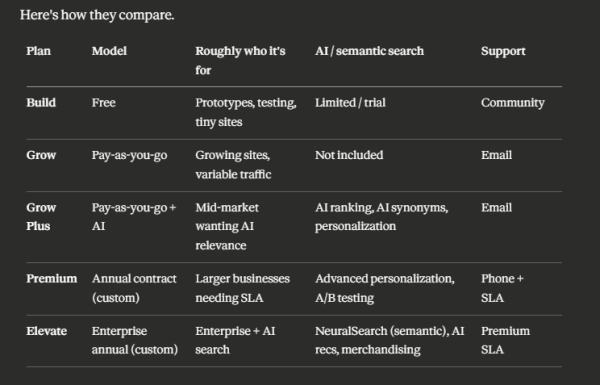
Algolia’s plans at a glance (2026)
What does Algolia cost? Real per-unit rates
Grow & Grow Plus
On the self-serve Grow plan, Algolia charges roughly $0.50 per 1,000 additional search requests and about $0.40 per 1,000 additional records beyond your included allowance. Grow Plus, which unlocks AI features, charges a notably higher per-request rate — published figures range from about $0.75 to as high as $1.75 per 1,000 requests depending on the source and configuration, so verify your exact rate with Algolia.
Build (Free Tier)
The free Build tier includes about 10,000 search requests per month. Its included record allowance has shifted over time — Algolia originally launched Build with one million free records in 2023, but more recent sources indicate the self-serve included allowance is now closer to 100,000 records. This is precisely the kind of detail that changes, so confirm it directly before relying on it.
Premium & Elevate
Enterprise tiers — Premium and Elevate — don’t publish flat rates. They’re sold as annual contracts with custom pricing, and one industry source pegs Elevate as starting around $50,000 per year. At that level you’re negotiating committed usage, SLAs, and feature bundles rather than buying off a price list.
For enterprise users, understanding Algolia Pricing can lead to more effective negotiations.
We keep a continually updated breakdown of these numbers, with worked overage math, on our Algolia pricing resource page.
Our resources on Algolia Pricing can clarify what to expect in your invoices.
AI Search Grader by bCloud AI
Grade your ecommerce search in 10 quick questions
31% of ecommerce searches return zero results — and most shoppers who hit a dead end leave for a competitor. How does your store's search stack up?
Answer 10 short questions and get your AI search score, plus a personalized report to fix the gaps. Free, takes about 2 minutes.
No signup needed to take the quiz.
Understanding intent…
Scoring your answers across relevance, AI, experience, and insights.
Your AI search score is ready
Tell us where to send your personalized report. You'll see your score and recommendations right away.
Your score by pillar
Personalized recommendations
Fix the gaps in weeks, not quarters
bCloud AI replaces keyword-only search with hybrid AI retrieval — sub-200ms responses, 99.99% uptime, and conversion lifts of up to 40% across 50+ implementations.
Real cost examples
A mid-sized store can move from “almost free” to several hundred dollars a month very quickly, because requests and records stack on top of each other. Here are two illustrative scenarios using the Grow-plan rates above (your real numbers will vary).
With detailed examples, we break down Algolia Pricing for your specific scenarios.
Switch that same volume to Grow Plus for AI search, and the higher per-request rate can push the bill toward ~$850/month — roughly a 3.5× jump driven entirely by the AI premium.
The lesson: as-you-type search and catalog growth are the two biggest cost multipliers. If your search box fires a request per keystroke, a single user session can represent dozens of billable requests. Teams that want to control this often look at search query optimization techniques to reduce wasted requests.
The hidden costs that surprise teams
Many teams are surprised by the hidden aspects of Algolia Pricing.
Algolia’s biggest budget surprises come from overages, AI-feature premiums, and annual commitments — not the base rates. Watch for these:
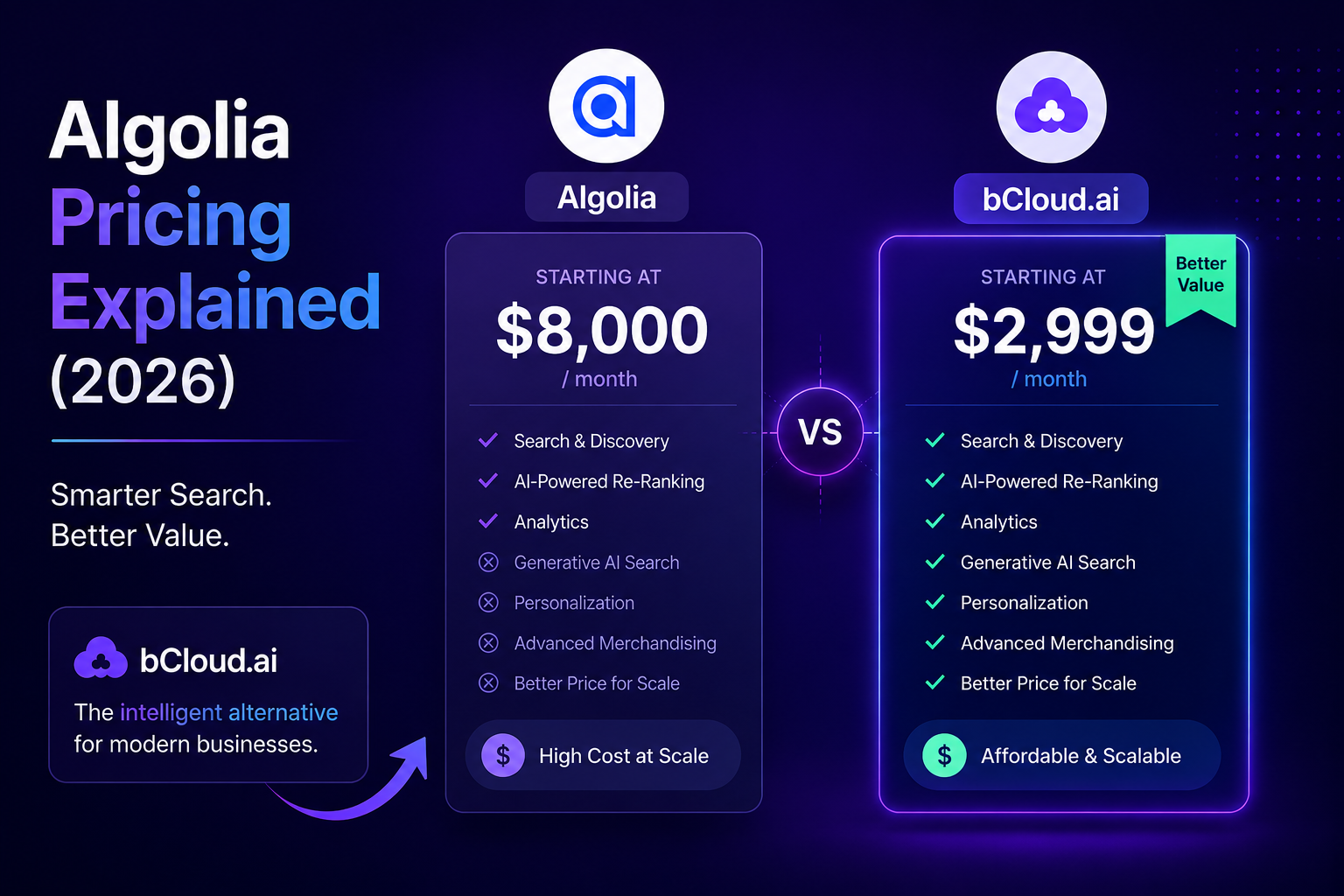
Algolia Pricing can be difficult to predict because the total cost depends on more than the advertised plan price. Search requests, indexed records, AI features, overages, annual commitments, and additional services can all affect the final bill. As an ecommerce store grows, higher search traffic and a larger product catalog can increase costs quickly, making it important to understand how each pricing component works. By evaluating expected usage alongside the features your store actually needs, you can choose a search plan more confidently and avoid unexpected increases in your monthly or annual search costs.
Is Algolia worth the price?
Ultimately, whether Algolia Pricing is worth it depends on your specific needs.
1T+
searches processed per year
18,000+
customers worldwide
382%
3-year ROI (Forrester study)
200+
integrations available
Weighing Algolia Pricing against its competitors can reveal valuable insights.
How bCloud AI compares
How to reduce your Algolia bill
The fastest way to control Algolia costs is to attack the two metrics directly: cut wasted search requests and trim your record count. Practical levers that work:
By optimizing usage, you can lower your overall Algolia Pricing.
These optimizations matter because Algolia’s model compounds: a request you don’t send and a record you don’t index both save money every single month, not once. Our guide to search query optimization for ecommerce goes deeper on reducing wasted queries.
Algolia pricing vs. the alternatives: the real question
The most useful question isn’t “how much is Algolia?” but “how predictable is my search cost as I grow, and is AI relevance included?” Algolia’s usage-based model is excellent when traffic is modest and stable. It becomes harder to love when:
Understanding the long-term implications of Algolia Pricing is essential for growth.
Seasonal or spiky traffic
Traffic is seasonal or spiky, so your bill swings unpredictably month to month.
Semantic/AI search needed
You need semantic/AI search, which pushes you to Grow Plus (a per-request premium) or Elevate (enterprise contract).
Large catalog
Your catalog is large, so the record metric alone is a meaningful line item.
For a small site with steady traffic and basic relevance needs, Algolia’s free or Grow tier can be genuinely cheap. For a scaling store that wants modern AI search, the total cost — base usage, AI premium, overages, annual commitment — is where teams start comparing platforms with bundled AI and flat or plan-based pricing. We lay those out, with pricing models side by side, in our Algolia alternatives guide.
As you evaluate your options, consider the future of your Algolia Pricing strategy.
The honest summary: Algolia is rarely “too expensive” in isolation — it’s that the cost is hard to forecast and the best AI features cost the most. Whether that’s a dealbreaker depends entirely on your traffic shape and how much you value predictability.
When Should You Upgrade Your Algolia Plan or Consider an Alternative?
Algolia works well for many businesses, but every ecommerce store eventually reaches a point where pricing, feature requirements, or traffic growth make it worth reassessing the platform. The right decision depends on your search volume, AI requirements, and long-term operating costs—not just your current monthly bill.
Stay with Algolia if…
- Your monthly search traffic is predictable.
- Your product catalog is relatively small.
- You don’t require advanced semantic AI search.
- Your current plan comfortably covers your usage.
- Your development team already relies on Algolia’s APIs.
Evaluate alternatives if…
- Your invoices increase every month because of usage-based billing.
- You need semantic or vector search without paying enterprise pricing.
- Your search traffic spikes during seasonal sales.
- Your catalog has hundreds of thousands of products.
- You want more predictable monthly costs.
Decision Checklist
Ask yourself these questions before renewing your current plan:
- Has your monthly search bill become difficult to predict?
- Are AI search features essential for your business?
- Will your catalog continue growing over the next 12 months?
- Can your current pricing model scale with holiday traffic?
- Would a platform with built-in AI and predictable pricing reduce your total cost of ownership?
Frequently asked questions
How much does Algolia cost per month?
It depends entirely on your search requests and record count. Small sites can stay near free; a mid-sized store running ~500K searches and ~250K records can pay a few hundred dollars a month on Grow, and meaningfully more on Grow Plus once AI features are added. Enterprise (Premium/Elevate) contracts are custom and can start in the tens of thousands per year.
What is Algolia’s pricing model?
A dual-metric, usage-based model: you pay for search requests and for indexed records, and your plan tier sets feature access, SLA, and support. Self-serve tiers bill monthly with no commitment; enterprise tiers are annual contracts.
Why is my Algolia bill higher than the advertised price?
Usually because of overages (billed at 1.5×–2×), as-you-type search inflating request counts, record growth, and AI features that require higher-priced tiers.
Does Algolia include AI and semantic search in its base price?
No. AI ranking and personalization require Grow Plus or higher, and semantic NeuralSearch is generally limited to the enterprise Elevate tier.
Is there a cheaper alternative to Algolia?
Several platforms offer AI search with more predictable pricing. Compare options in our Algolia alternatives guide, and check whether AI/semantic search is included rather than billed as a premium.
To sum up, careful consideration of Algolia Pricing can greatly impact your bottom line.