
What Is Ecommerce Search Analytics?
Why Ecommerce Search Analytics Matters
Search data is uniquely honest. Unlike surveys or session recordings, queries capture intent directly: a shopper typing “waterproof hiking boots wide fit” has told you their need, their category, and their constraint in five words. Aggregated, that language becomes strategy — what to stock, what to promote, which content to write, and where the search experience fails. The cost of ignoring it is equally direct: failed and low-converting searches are lost revenue at the moment of highest intent, and without analytics they stay invisible. Stores that treat search analytics as a weekly operating rhythm consistently out-optimize those that set search up once and never look again.
AI Search Grader by bCloud AI
Grade your ecommerce search in 10 quick questions
31% of ecommerce searches return zero results — and most shoppers who hit a dead end leave for a competitor. How does your store's search stack up?
Answer 10 short questions and get your AI search score, plus a personalized report to fix the gaps. Free, takes about 2 minutes.
No signup needed to take the quiz.
Understanding intent…
Scoring your answers across relevance, AI, experience, and insights.
Your AI search score is ready
Tell us where to send your personalized report. You'll see your score and recommendations right away.
Your score by pillar
Personalized recommendations
Fix the gaps in weeks, not quarters
bCloud AI replaces keyword-only search with hybrid AI retrieval — sub-200ms responses, 99.99% uptime, and conversion lifts of up to 40% across 50+ implementations.
The Key Ecommerce Search Analytics Metrics
A handful of metrics carry most of the insight.
Search Usage Rate
The share of visitors who use search. Search users typically convert at a multiple of browsers, so growing this number — through a prominent, inviting search bar — lifts total revenue.
Search Conversion Rate
Conversion on search-led sessions versus browse-only sessions. The gap shows how much value search creates; a shrinking gap flags relevance problems.
Zero-Results Rate
The share of queries returning nothing. Industry averages run around 31%, and every point of improvement recovers real revenue — see our full guide to zero results search.
Top Queries and Top Failing Queries
Your highest-volume searches and the highest-volume searches that fail or under-convert. These two lists are the fastest route to prioritized fixes.
Click-Through and Click Depth
Whether shoppers click the first results or scroll deep. Deep scrolling signals ranking problems — the right products exist but sit too low.
Refinement and Exit Rates
How often shoppers re-search, add filters, or leave after searching. High refinement suggests initial results miss intent; exits mark where revenue leaks.
9 Proven Ways to Turn Search Analytics Into Revenue
| # | Action | Why it works |
|---|---|---|
| 1 | Fix top failing queries first | Highest-volume failures = biggest recoverable revenue |
| 2 | Mine queries for synonyms | Shopper language becomes matching rules |
| 3 | Spot assortment gaps | Failed searches for unstocked items = sourcing signals |
| 4 | Tune ranking with click data | Deep-scroll queries reveal misordered results |
| 5 | Feed merchandising decisions | Top queries show what to feature and when |
| 6 | Write content shoppers want | Question-style queries reveal content gaps |
| 7 | Improve autocomplete | Popular queries become suggestions that guide |
| 8 | Segment by device and audience | Mobile and B2B search differently — treat them so |
| 9 | Report revenue, not clicks | Tie search work to dollars to sustain investment |
From Dashboards to Decisions: A Weekly Rhythm
Analytics only pay when they change decisions, so the strongest teams run a simple weekly rhythm. Monday: review top failing and low-converting queries from the past week; assign each a cause (data gap, synonym, ranking, assortment). Midweek: ship the fixes — enrich attributes, add synonyms, adjust rules. Friday: check whether last week’s fixes moved the numbers. Monthly: review deeper trends — seasonal shifts, category movements, new query language — and feed them to merchandising and buying. This loop compounds: each cycle recovers revenue and teaches the team more about how their shoppers actually speak.
Search Analytics and Catalog Strategy
The most under-used application of ecommerce search analytics is catalog strategy. High-volume failed queries for products you don’t carry are among the cleanest demand signals in retail — shoppers literally requesting items you could stock. Query language also reveals how shoppers name and describe products, which should flow back into titles, attributes, and catalog enrichment so future searches match. And category-level search trends often lead sales trends by weeks, giving buying teams early warning on demand shifts. Treating search analytics as a merchandising and buying tool — not just an engineering dashboard — is where much of its strategic value lives.
Search Analytics and AI Personalization
Search analytics also powers the AI layer. Behavioral signals — clicks, conversions, refinements — are the training data that makes AI search ranking smarter and personalization more accurate. The richer and cleaner your event capture, the faster the models learn. This creates a virtuous cycle: better analytics improve AI relevance, better relevance produces more meaningful behavioral data, and the loop keeps compounding. When evaluating platforms, check that analytics events are captured automatically and feed the ranking models directly, rather than living in a separate reporting silo that never influences results.
Common Ecommerce Search Analytics Mistakes
The most common mistakes are predictable. Tracking clicks instead of revenue, so search work never gets credit for business impact. Reviewing dashboards quarterly instead of weekly, letting fixable failures run for months. Treating zero-results as an engineering metric rather than a merchandising one. Ignoring device segmentation, even though mobile search behaves differently. Failing to close the loop — collecting data but never shipping fixes. And keeping analytics siloed from the teams (merchandising, buying, content) who could act on the insight. The fix in every case is the same: a regular rhythm, revenue-denominated reporting, and shared visibility.
Ecommerce Search Analytics by Team
Different teams extract different value from the same data, and the strongest programs give each one a view. Merchandising uses ecommerce search analytics to decide what to feature, boost, and bundle — top queries are a live feed of demand. Buying and planning teams mine failed queries for assortment gaps and watch category search trends as an early-warning system. Content and SEO teams turn question-style queries into articles and guides that capture the same demand in organic search. Engineering and product teams monitor zero-results, speed, and funnel drop-offs as the operational health metrics of the search system itself. When all four teams work from a shared dashboard, ecommerce search analytics stops being a report and becomes an operating system for the store.
Connecting Search Analytics to Business Reporting
To sustain investment in search, the numbers have to reach the business in business terms. Translate search metrics into revenue: search-attributed revenue per week, recovered revenue from fixed failing queries, and the conversion gap between search and browse sessions expressed in dollars. Attribute improvements honestly — before/after comparisons on the specific queries you fixed, holdout tests where feasible — so the lift is credible. And report trends, not snapshots: a zero-results rate falling from 20% to 8% over a quarter tells a stronger story than any single week. Teams that report ecommerce search analytics this way find budget conversations far easier, because search stops being a cost center and starts being a documented revenue engine.
Getting Started in One Afternoon
If you’ve never looked at your search data, the first pass takes an afternoon and usually pays for itself. Pull the last 30 days of queries. Sort by volume. Flag everything with zero results or conversion below your site average. Group the failures by cause — misspelling, synonym gap, missing attribute, missing product. Fix the top ten. That single exercise typically recovers meaningful revenue and, more importantly, proves the loop works — which is what turns a one-off audit into the weekly rhythm that compounds.
How Ecommerce Search Analytics Drives Revenue
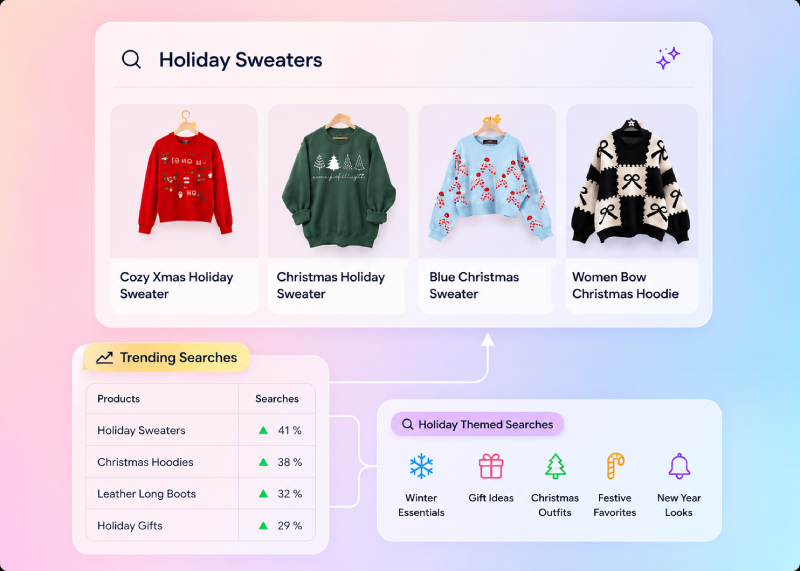
Ecommerce search analytics turns shopper behavior into practical opportunities to improve search relevance, product discovery, and revenue. By analyzing what customers search for, which queries fail, where they refine results, and which searches lead to purchases, retailers can identify the highest-impact problems instead of relying on assumptions. These insights can guide synonym improvements, ranking changes, catalog enrichment, merchandising decisions, content creation, and assortment planning. When search analytics is connected to revenue and reviewed consistently, every failed or underperforming query becomes an opportunity to improve the customer experience and recover value from existing search traffic.
How bCloud AI Powers Ecommerce Search Analytics
bCloud AI builds analytics directly into its discovery platform. Every query, click, refinement, add-to-cart, and conversion is captured automatically and surfaced in dashboards built for action: top queries, top failing queries, zero-results tracking, revenue attribution per query, and device and audience segmentation. Because analytics share the same engine as search, the behavioral data feeds ranking and personalization models directly — insight and improvement in one loop rather than a separate reporting tool. To see how analytics fit the wider platform, explore the ecommerce search overview or the best ecommerce search engines for 2026.
Ecommerce Search Analytics Health Scorecard
A modern analytics platform should do more than collect search data—it should turn that data into actionable business insights. Use this quick scorecard to evaluate whether your current search analytics setup is helping your business grow.
Score yourself: If your business can confidently check all five boxes, your search analytics program is providing meaningful business insights. If not, improving visibility into shopper behavior should be one of your highest-priority ecommerce initiatives.
Frequently Asked Questions About Ecommerce Search Analytics
What is ecommerce search analytics?
Ecommerce search analytics is the collection and interpretation of data from your store’s onsite search — queries, results, clicks, refinements, conversions, and abandonments. It reveals what shoppers want in their own words, where search fails, and where revenue leaks, so teams can fix and improve continuously.
Why is search analytics important for ecommerce?
Search queries are shoppers explicitly stating intent at the moment of highest purchase readiness. Analytics turn that language into strategy — what to stock, feature, fix, and write — and expose failures that would otherwise stay invisible while quietly costing revenue.
What are the key search analytics metrics?
The core metrics are search usage rate, search conversion rate versus browse, zero-results rate, top queries and top failing queries, click-through and click depth, and refinement and exit rates. Together they show where search creates value and where it leaks.
What is a good zero-results rate?
Under 5% for high-volume queries is a strong baseline. Industry averages run around 31%, so most stores have significant recoverable revenue. Top failing queries show exactly where to start.
How often should I review search analytics?
Weekly for operational fixes (failing queries, synonyms, ranking issues) and monthly for strategic trends (seasonal shifts, category movements, assortment gaps). Quarterly-only reviews let fixable failures run for months.
How does search analytics help with catalog decisions?
High-volume failed queries for unstocked items are direct demand signals for sourcing. Query language shows how shoppers name products, guiding titles and attribute enrichment. And category search trends often lead sales trends, giving buying teams early warning.
How does search analytics improve AI search?
Behavioral signals — clicks, conversions, refinements — train AI ranking and personalization models. Platforms that feed analytics directly into their ranking engine create a compounding loop: better data improves relevance, and better relevance produces richer data.
What is the best ecommerce search analytics tool?
The best tool is built into the search platform itself, captures events automatically, attributes revenue per query, tracks zero-results and failing queries, segments by device, and feeds the AI ranking models directly. Leading AI-native options include bCloud AI.
See What Your Shoppers Are Really Asking For
Start for free or book a demo to see search analytics that feed directly into AI ranking and personalization.
Related resources: Zero Results Search · Analytics product · Ecommerce Search Overview · Best Ecommerce Search Engines for 2026