What Is an Ecommerce Search API?
Why Use an Ecommerce Search API?
Building product search in-house is deceptively hard: relevance tuning, typo tolerance, synonyms, vector embeddings, scaling, and sub-second latency are full-time engineering problems. A search API gives you enterprise-grade relevance without that burden, and it is the natural fit for headless and composable commerce, where the front end and back end are decoupled. You get speed, flexibility, and control — embed search anywhere, from a React storefront to a mobile app — while the provider handles infrastructure. It pairs naturally with the broader ecommerce search platform and the underlying product search engine.
9 Powerful Capabilities of a Modern Ecommerce Search API
When you evaluate any search API, look for these nine capabilities.
| # | Capability | What it does |
|---|---|---|
| 1 | REST / JSON endpoints | Simple HTTP requests, structured responses, any language |
| 2 | Hybrid ranking | Keyword (BM25) + semantic vector search in one query |
| 3 | Natural language | Understands full-sentence and conversational queries |
| 4 | Autocomplete endpoint | Sub-100ms type-ahead suggestions with products |
| 5 | Faceted filtering | Filter and facet parameters returned with results |
| 6 | Personalization & events | Send click/purchase events; get per-shopper ranking |
| 7 | Indexing / sync API | Push catalog updates in real time |
| 8 | Typo tolerance & synonyms | Automatic correction without manual dictionaries |
| 9 | Analytics | Query, zero-result, and conversion data via API |
How to Integrate an Ecommerce Search API
Integration follows three steps: index your catalog, call the search endpoint, and render the results and facets.
Index Your Catalog
First, push your products to the index via the indexing API — titles, descriptions, attributes, prices, and images. A modern engine encodes each product into a vector for semantic matching. Most providers, including bCloud AI, also offer connectors for Shopify, BigCommerce, Magento, and WooCommerce so the catalog stays in sync automatically. Clean data matters here, so an enrichment step pays off.
Call the Search Endpoint
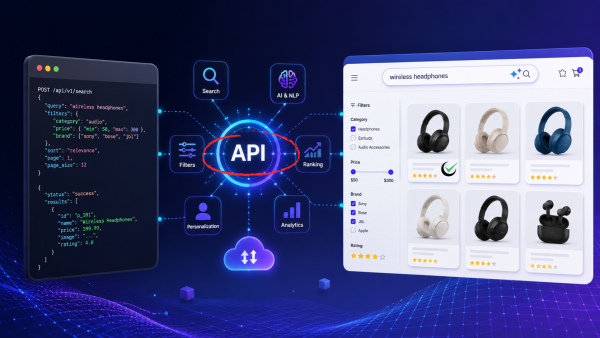
Send the shopper’s query as a simple POST request. An illustrative call looks like this:
The API returns ranked products plus the facets to render:
Render Results and Facets
Map the JSON response to your UI: render the product cards from results, build the filter panel from facets, and wire the autocomplete endpoint to your search bar. Because everything is structured JSON, the same API powers web, mobile, and in-store experiences alike.
Ecommerce Search API Best Practices
A few practices keep your integration fast, secure, and reliable.
Secure Your Keys
Use a public, search-only key on the client for queries, and keep your private admin key (for indexing) on the server only. Never expose write credentials in front-end code.
Debounce and Cache
Debounce autocomplete requests as the shopper types, and cache common queries at the edge. A good search API already edge-caches popular searches for sub-100ms responses, but client-side debouncing further reduces load.
Mind Rate Limits and Latency
Understand the provider’s rate limits, request results asynchronously, and keep payloads lean. Target sub-200ms end to end; on mobile especially, latency directly affects conversion.
Handle Zero-Results Gracefully
When total is zero, do not show a blank page. Use the API’s suggestion or related-products response to surface alternatives so a near-miss query still converts.
Platforms and Frameworks
A good search API works everywhere. Look for first-class support for Shopify Plus, BigCommerce, Magento, and WooCommerce, plus SDKs or clean REST integration for modern front ends built in React, Vue, or Next.js, and headless or composable architectures. bCloud AI’s REST API connects to virtually any catalog architecture, structured or unstructured, through robust integrations and data transformation tools. Google’s own guidance on AI features in Search is a reminder that structured, well-organized data also helps your products surface in AI Overviews and assistants.
Build vs. Buy: Should You Build Your Own Search API?
Some teams consider building search in-house on open-source tools like Elasticsearch or OpenSearch. It is a legitimate path for organizations with dedicated search engineers, but it is a large, ongoing commitment: you own the relevance tuning, the vector infrastructure, the scaling, the uptime, and the constant maintenance as catalogs and query patterns change. A hosted service gives you enterprise-grade relevance, semantic understanding, and sub-second latency out of the box, so your engineers can focus on the storefront rather than reinventing search infrastructure. For the majority of retailers, buying is faster, cheaper over time, and far lower risk — you reach production-grade search in days, not quarters, and you inherit improvements automatically as the provider’s models advance.
Common Integration Pitfalls to Avoid
A few mistakes trip up first-time integrations. Indexing dirty data is the most common: if titles and attributes are inconsistent, even a great engine returns weak results, so clean and enrich the catalog before indexing. Skipping the events feed is another — without click and purchase signals, personalization and behavioral ranking never kick in, so wire up event tracking early. Teams also forget to handle pagination and partial responses, render autocomplete without debouncing (hammering the endpoint), and neglect the zero-results path. Finally, do not hard-code provider-specific response shapes throughout your front end; wrap the service behind a thin client layer so you can adapt to schema changes or swap providers without a rewrite.
Keeping the Catalog in Sync
Search is only as fresh as its index. Decide between real-time updates (push changes as they happen via webhooks) and scheduled re-indexing (a periodic full sync), and use both where it makes sense: real-time for price and stock changes shoppers must see immediately, and a nightly full sync as a safety net. Most managed providers, including bCloud AI, offer connectors that handle this automatically for Shopify, BigCommerce, Magento, and WooCommerce, so the index stays current without custom plumbing.
Measuring API-Powered Search Performance
Once live, track the metrics that matter: search latency (p50 and p95), zero-results rate, click-through on search results, and search-driven conversion. Most providers expose these through an analytics endpoint or dashboard. Watching them weekly tells you where to tune relevance, which queries need synonyms or merchandising, and whether latency is creeping up as your catalog grows — turning raw query logs into a prioritized roadmap.
Developer Experience Matters
When you choose a provider, weigh the developer experience as heavily as the features: clear documentation, official SDKs for your language, sandbox keys for testing, predictable error handling, and responsive support all determine how fast you ship and how painlessly you maintain the integration over time. A powerful engine behind a confusing interface will cost you more in engineering hours than it saves.
How bCloud AI’s Ecommerce Search API Works
bCloud AI provides an AI-native ecommerce search API built on its hybrid retrieval engine. A single search call returns results that blend keyword precision with semantic understanding, plus facets, autocomplete, and real-time personalization, typically in under 200 milliseconds at 99.99% uptime. The API is developer-friendly and API-first by design, with full visibility into how and why results are ranked and fine-grained relevance controls — and it can index any structured or unstructured content you feed it, from product catalogs to help docs. To go deeper on the technology, see our AI e-commerce search guide, and to compare providers, our roundup of the best ecommerce search engines for 2026.
Security and Compliance for Ecommerce Search APIs
Search APIs process customer queries, product information, and behavioral events, making security an essential part of every integration. A modern ecommerce search API should protect both your infrastructure and customer data without compromising performance.
API Authentication
Use separate public and private API keys. Public keys should only perform search requests, while administrative keys for indexing and configuration must remain securely stored on the server.
Encrypted Communication
All API traffic should use HTTPS with TLS encryption to protect search queries, customer interactions, and catalog updates while they travel between applications.
Rate Limiting & Monitoring
Rate limiting prevents abuse and unexpected traffic spikes, while monitoring and logging help identify unusual activity before it affects customers.
Compliance Standards
If your ecommerce platform operates globally, choose a provider that supports standards such as GDPR, SOC 2, and PCI DSS where applicable, ensuring customer data is handled responsibly.
A secure ecommerce search API protects more than product data—it safeguards customer trust. Strong authentication, encrypted communication, intelligent rate limiting, and compliance with industry standards allow retailers to deliver AI-powered search while maintaining enterprise-grade security.
Frequently Asked Questions About the Ecommerce Search API
What is an ecommerce search API?
An ecommerce search API is a hosted service that accepts a search query over HTTP and returns ranked product results as structured JSON. It handles indexing, query understanding, ranking, and facets, so your application only sends a request and renders the response. Modern ones are AI-powered with semantic and keyword search.
How do I integrate an ecommerce search API?
In three steps: index your catalog via the indexing endpoint, send the shopper’s query to the search endpoint as a POST request, and render the returned products and facets in your UI. Connectors for Shopify, BigCommerce, Magento, and WooCommerce keep the catalog in sync automatically.
Is an ecommerce search API good for headless commerce?
Yes. A REST-based ecommerce search API is ideal for headless and composable commerce because the front end and back end are decoupled. You can embed the same search across web, mobile apps, and in-store experiences from one API.
What can an ecommerce search API do?
It provides keyword and semantic ranking, natural language understanding, autocomplete, faceted filtering, typo tolerance and synonyms, personalization via events, real-time indexing, and analytics — all through HTTP requests that return structured JSON.
How fast should an ecommerce search API be?
Aim for sub-200ms end to end, with autocomplete under 100ms. Leading APIs edge-cache popular queries and use hybrid retrieval to stay fast even across very large catalogs.
How do I secure an ecommerce search API?
Use a public, search-only key on the client for queries and keep the private admin key for indexing on the server. Never expose write credentials in front-end code, and rely on the provider’s TLS and access controls.
Which platforms does an ecommerce search API support?
A good ecommerce search API supports Shopify Plus, BigCommerce, Magento, WooCommerce, and headless setups, with clean REST integration for React, Vue, and Next.js front ends.
What is the best ecommerce search API?
The best ecommerce search API offers hybrid AI ranking, fast autocomplete, faceted filtering, personalization, real-time indexing, and broad integrations. Leading options include bCloud AI, Algolia, and Elastic, with the right fit depending on your stack and catalog.
Build With an AI-Powered Ecommerce Search API
Add fast, relevant, AI-powered product search to any stack through a clean REST API. Start for free or book a demo to see the ecommerce search API in action.
Related resources: Product Search Engine · Ecommerce Search Platform · Ecommerce Search Bar · AI E-Commerce Search Guide